Author name: Michael Dhot

Events

Oktoberfest

September 19th-20th. River Point District, Norfolk Fun for the entire family. Bounce Houses, face painting, big wheel races, wiener dog races, bucket pong and corn hole tournaments, drum line exhibition, beer and wine gardens, food vendors, Husker games on the big screen and live music throughout.

Events

4th Street Festival

September 27th- 28th 4th Street, Grand Island Enjoy tons of entertainment and food for the whole family; activities, car show, bike show, music, bounce houses, Mexican wrestling, boxing matches and tastes from around the world. On Grand Island’s 4th Street.

Events

14th Annual Fall Affair

October 11th Brush Fair Grounds This event raises funds to support East Morgan County Hospital’s capital needs to provide quality healthcare in Morgan County. The event will feature dinner, auctions, and entertainment for the whole family.

Events

Trunk or Treat

October 31st Rendezvous Square, Ogallala Chamber event where staff will dress up and decorate a Viaero car to hand out candy to hundreds of families from the Ogallala area.

Insights, Tech

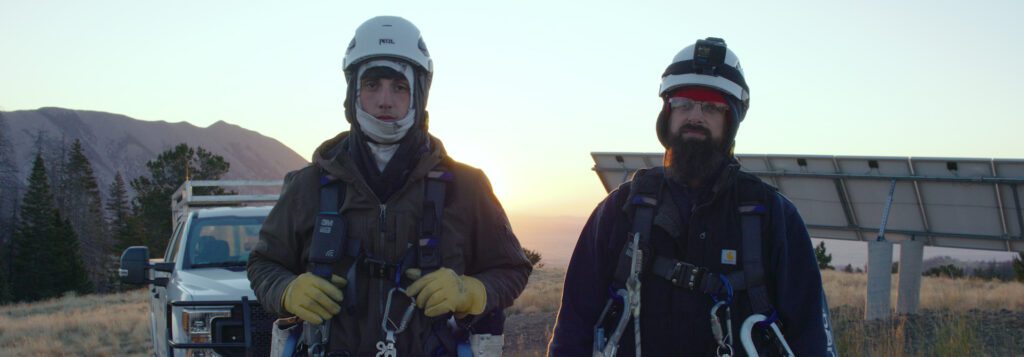
What It Takes to Be a Cell Site Tower Climber

Climbing Higher to Keep You Connected When you make a call, stream a video, or check your GPS, you’re relying on a massive, invisible infrastructure that keeps you connected. Behind the scenes—and hundreds of feet in the air—are the men and women who make that connection possible: cell site tower climbers. This is not your average 9-to-5 job. It’s a career that requires skill, strength, and serious guts.   The Role: More Than Just Climbing Cell tower climbers are responsible for installing, maintaining, and repairing the antennas and equipment that power wireless communication networks. Their work directly supports everything from emergency 911 calls to streaming your favorite show. Typical tasks include: Installing antennas, radios, and fiber connections Running cables and securing hardware Diagnosing and fixing technical issues at the top of towers Upgrading equipment for faster, more reliable service (like 5G) Documenting site conditions and maintenance The Climb: Physical and Mental Demands Most towers range from 100 to 600 feet tall or higher. That means climbers must be in excellent physical condition—but that’s only half the story. They also need to be mentally sharp, calm under pressure, and laser-focused on safety.   Key traits of a successful tower climber: Fearless, but safety-first: You can’t be reckless or scared of heights. Safety is always the top priority. Technically skilled: Climbing is just the beginning—you also need to know your tech. Team-oriented: Most work is done in small crews that depend on each other for safety and success. Detail-driven: One mistake can cost lives or disrupt service. Precision matters. Training & Certification You don’t become a tower climber overnight. While some climbers start with a background in construction or electrical work, specialized training is essential. Reputable companies like Viaero Wireless and Industrial West Tower often provide in-house training or require certifications such as: OSHA 10/30: Occupational safety training RF Awareness: Understanding radio frequency hazards Tower Rescue and Climbing Safety: Including fall protection techniques CPR/First Aid Hands-on experience is critical—and usually the fastest path to growth in the field. The Reward: Purpose & Payoff Tower climbing is not for everyone, but for those who choose this path, it offers a deep sense of purpose and often competitive pay, especially as demand for faster networks like 5G grows. Many climbers say the view alone—standing on top of the world—makes it worth it.  It’s an office with a view. Final Thoughts Cell tower climbers are the unsung heroes of our modern world. They rise—literally—to the challenge so the rest of us can stay connected wherever we are. It’s a job that combines adrenaline, technology, and impact in a way few others can.   Thinking of Becoming a Tower Climber?Make sure you’re ready for the climb—and the responsibility that comes with it. Because in this line of work, every step matters. Do you have what it takes?  Please consider Viaero Wireless and Industrial West Tower to take your career to the next level. 

Press Release

Viaero Wireless Teams Up with 9NEWS (KUSA) to Launch Viaero’s Weather Camera Network

Denver, CO – July 29, 2025  Viaero Wireless is proud to announce the official launch of its Viaero Weather Camera Network, now airing exclusively through Denver’s 9NEWS (KUSA) Network covering Denver, northern and eastern Colorado beginning Monday, July 28. This groundbreaking collaboration brings real-time, high-definition views of weather conditions from over 80+ rural and high-risk locations across Colorado, and Nebraska —areas often underserved by traditional radar or broadcast systems. With this initiative, Viaero and 9NEWS are working together to elevate public safety and weather awareness for communities that need it most. “At Viaero, we’ve always prioritized rural connectivity and community safety,” said Frank DiRico, CEO/Owner at Viaero Wireless. “This weather camera network brings life-saving visibility to regions often missed by standard coverage—especially during fast-moving storms, wildfires, and blizzards.” The Viaero Weather Camera Network includes: High-definition, live weather feeds• Strategic camera placement across Eastern Colorado and the Central Plains• Real-time access for 9NEWS meteorologists, first responders, and the public This network enhances the station’s ability to deliver hyper-local, visual updates during critical weather events, giving viewers a clearer, more accurate picture of what’s unfolding in real time. “9NEWS is excited to team up with Viaero to bring our viewers unprecedented access to what’s happening across the region,” said KUSA News Director Linda Kicak, “These cameras will be a vital tool for the 9NEWS Weather Impact Team in reporting on severe weather coverage moving forward.” “The live camera feeds will be available on 9NEWS broadcasts and online, helping residents to make informed decisions and stay safe.”  About Viaero Wireless Viaero Wireless has been serving rural communities across Colorado, Nebraska, Kansas, and Wyoming for more than 30 years with reliable cellular, Fixed wireless and Fiber Internet solutions and now life-saving technology infrastructure. The Viaero Weather Camera Network is the latest example of its commitment to innovation and public safety. For more information and to view the live camera feeds, visit: viaero.com/weather-cameras/ Media Contact:Lori Searls Director of MarketingViaero Wirelesslori.searls@viaero.com970.768.5533

Insights

Choosing the Right Business Internet: A Breakdown of Your Best Options

Whether you’re running a small office, a mid-sized operation, or a large enterprise, the quality of your internet connection can make or break productivity, customer satisfaction, and your ability to scale. Not all internet services are created equal—especially when it comes to business use. Below, we compare the most common types of internet connectivity: Cable, Aerial Fiber, Underground Fiber, and Satellite. Speed & Performance Cable Internet: Offers fast download speeds, but upload speeds often lag—potentially impacting cloud backups or video conferencing. Aerial Fiber: Delivers symmetrical, ultra-fast speeds, which are essential for modern collaboration tools and high data transfers. Underground Fiber (Clear Winner): Like aerial fiber, it offers symmetrical, lightning-fast speeds—without the vulnerabilities of above-ground lines. Satellite: Often inconsistent with slower speeds and upload delays. Weather and distance to the satellite can also cause issues. Network Reliability Cable: Prone to slowdowns during peak hours and outages due to shared lines. Aerial Fiber: Reliable but can be affected by weather or physical damage to poles. Underground Fiber: Top-tier reliability, protected from the elements and physical interference. Satellite: Weather disruptions and signal delays are common. Scalability Cable: Best for small-scale operations. It struggles with bandwidth as demand increases. Aerial Fiber: A good middle ground for growing businesses in suburban or rural areas. Underground Fiber: The gold standard for businesses planning long-term growth or requiring robust data handling. Satellite: Not ideal for scaling due to limited bandwidth and high latency. Downtime & Risk Cable: Shared infrastructure increases chances of network slowdowns or downtime. Aerial Fiber: Some vulnerability to external elements, but more consistent than cable. Underground Fiber: Minimal risk thanks to redundant systems and buried infrastructure. Satellite: High downtime risk from weather and orbital issues. Uploads, Latency, and Security Upload Speeds: Only fiber (aerial and underground) offers symmetrical uploads. Latency: Underground and aerial fiber have the lowest latency—ideal for VoIP, remote desktops, and real-time collaboration. Security: Underground fiber offers the most secure setup. Cable and satellite connections are more vulnerable to breaches or service interruptions. Installation and Support Cable: Quick to install but may lack robust customer service or SLAs. Aerial Fiber: Takes more time, but most providers offer service-level guarantees. Underground Fiber: Slightly longer installation, but the payoff in reliability and performance is worth it. Satellite: Fast setup but limited by satellite alignment and geographic visibility. Best Fit By Business Type Cable Internet: Suitable for small offices with light internet use like email, web browsing, and cloud-based apps. Aerial Fiber: Ideal for mid-sized businesses needing reliable speeds and rural locations without underground infrastructure. Underground Fiber: The top choice for businesses that demand maximum uptime, security, and performance—perfect for healthcare, finance, data centers, and enterprise operations. Satellite: Best for extremely remote areas where no wired connection is available.   The Bottom Line When choosing the best internet connection for your business, think long-term. Underground fiber may require a moderate investment upfront, but it provides unmatched performance, scalability, and peace of mind. If you’re serious about growth, reliability, and staying ahead of the digital curve, the decision is clear. Looking for expert guidance on getting started with business-grade fiber internet? Contact our team today.

Tech

Debunking the Top 10 Myths About Fiber Optic Internet

Fiber optic internet has revolutionized the way we connect and communicate, yet there are still many myths and misconceptions surrounding this technology. Let’s debunk the top 10 myths about fiber optic internet: Myth: Fiber Optic Internet is Expensive Reality: While fiber optic infrastructure may have higher initial installation costs, fiber internet service itself is often competitively priced and offers better value due to its reliability and high speeds. Myth: Fiber is Only for Large Businesses Reality: Fiber optic internet is suitable for businesses of all sizes, from small startups to large enterprises. It offers scalable solutions that can adapt to the needs of any business. Myth: Fiber is Prone to Service Outages Reality: Fiber optic cables are less susceptible to service interruptions caused by weather conditions or electrical interference compared to traditional copper cables, making fiber internet more reliable. Myth: Fiber is Limited to Urban Areas Reality: Fiber optic networks are expanding rapidly, reaching rural areas as well. Many providers are investing in fiber infrastructure to bridge the digital divide and provide high-speed internet to underserved communities. Myth: Fiber is Vulnerable to Damage Reality: Fiber optic cables are durable and resistant to environmental factors such as water, heat, and electromagnetic interference when installed underground. Buried fiber is protected by conduits to minimize the risk of damage. Myth: Fiber is Complex to Install Reality: While the initial installation of fiber optic infrastructure requires expertise, once in place, fiber internet connections are straightforward to set up and maintain. Myth: Fiber is Only for Internet Reality: Fiber optic networks support a wide range of services, including voice (VoIP), video streaming, cloud computing, and more. Fiber enables a seamless and efficient communication ecosystem. Myth: Fiber is Not Secure Reality: Fiber optic transmissions are highly secure due to their low susceptibility to eavesdropping or hacking. Encrypted data over fiber lines adds an extra layer of security. Myth: Fiber is Not Widely Available Reality: Fiber optic networks are continuously expanding, with many providers offering fiber internet services in various regions. Availability may vary, but the trend is toward increased coverage. Myth: Fiber is Not Worth the Investment Reality: The long-term benefits of fiber optic internet, such as faster speeds, lower latency, reliability, scalability, and futureproofing, far outweigh the initial investment. Fiber is a valuable asset for businesses and individuals and can increase your property values. By debunking these myths, we aim to promote a better understanding of fiber optic internet and highlight its numerous advantages in today’s digital landscape.

Tech

Choosing the Right Internet Speed for Your Family: What You Need to Know

In today’s connected world, fast, reliable internet isn’t a luxury—it’s a necessity. From streaming and gaming to working and learning from home, your family depends on strong internet every day. But with so many speed options available, how do you know what’s right for your household? Let’s break it down in simple terms so you can make a confident decision that fits your family’s needs, your lifestyle, and your local options. Start with How Your Family Uses the Internet Every household is different. The “right speed” depends on what you use the internet for—and how many people are using it at once. Ask yourself: Do you stream in HD or 4K? Are multiple people online at the same time? Do you have gamers or remote workers in the house? Are smart devices (like thermostats or security cameras) connected to your network? Do you have a home business? Here’s a rough guideline: Activity Minimum Speed (Per Device) Web browsing, email 1–5 Mbps HD video streaming 5–10 Mbps 4K video streaming 25 Mbps Online gaming 10–25 Mbps Video calls (Zoom, Teams) 5–10 Mbps Smart Home devices   Large file downloads or uploads 50+ Mbps Multiply those numbers by the number of people or devices using them at the same time, and you’ll start to get a better idea of what your household needs. Local Providers Matter More Than You Think You can pick the perfect speed on paper—but if your local internet provider doesn’t deliver reliably, it won’t matter. That’s why choosing a local provider with a proven track record can make all the difference. Look for: Consistent service and uptime Responsive local customer support Flexible plans based on your community’s real-world needs Fair pricing without surprise fees or throttling In many areas, regional providers offer fiber internet that delivers faster speeds, more reliability, and lower latencythan national cable or satellite providers.   What Customers Actually Want At the end of the day, families don’t just want “fast.” They want: Reliable connections that don’t drop during a Zoom call or movie night Enough bandwidth to support multiple users and devices No buffering, freezing, or spinning wheels Affordable pricing that doesn’t skyrocket after the first year Support they can actually reach when something goes wrong Final Thought: Match Speed with Support Choosing the right internet speed isn’t just about Mbps—it’s about how your provider supports you. The best plan is one that fits your family’s lifestyle, backed by a team that knows your neighborhood and treats you like more than a number. Why So Many Families Trust Viaero Wireless At Viaero Wireless, we understand what families in our communities need—because we live and work here too. We provide: High-speed fiber and broadband internet built for real-life usage Flexible plans to meet the needs of any household size Local customer service you can actually talk to No hidden fees or gimmicks—just dependable service Whether you’re working from home, helping your kids with homework, or enjoying a movie night, Viaero is committed to keeping you connected—with speeds and support you can count on. Let’s find the perfect internet plan for your family.Visit your local Viaero store or check availability in your area today.

Insights

Keeping Kids Safe Online: What Every Parent Should Know (and the Tools That Help) 

In today’s connected world, our children have access to more information, people, and content than ever before. While the internet opens up opportunities for learning and growth, it also comes with real risks—cyberbullying, inappropriate content, online predators, and excessive screen time, just to name a few. As parents, it’s not about instilling fear—it’s about staying informed and empowered. Keeping kids safe online is an extension of how we keep them safe in the real world. That means understanding the risks, starting age-appropriate conversations, and using smart tools to monitor and guide their digital behavior. Why Online Safety Matters Children are growing up in a digital age where smartphones, social media, and gaming are part of daily life. But what may feel harmless to them—like chatting with new friends or exploring new apps—can quickly spiral into unsafe territory. Key risks include: Cyberbullying: Harassment and harmful behavior on platforms like Snapchat, Instagram, or messaging apps. Predators: Adults pretending to be peers to engage with children online. Inappropriate content: From violent videos to explicit material, much of the internet isn’t kid-friendly. Mental health: Constant exposure to curated lives and unrealistic standards can impact a child’s self-esteem and emotional wellbeing.   Tools That Can Help Parents Stay in the Know Fortunately, there are apps and devices that give parents greater visibility and control over their children’s digital lives—without being overly invasive.   Bark: Smarter Monitoring for ages 8 to 12 years of age Bark is an award-winning app that helps parents monitor texts, emails, YouTube, and 30+ social media platforms for signs of harmful content. It uses advanced AI to detect potential risks like: Cyberbullying Suicidal ideation Online predators Drug-related content Explicit messages and images Parents are alerted only when something potentially concerning is detected, allowing for privacy and trust, while still being proactive. Click here to learn more: Bark — Parental Controls for Families   Xplora X6 Playa Watch: Safe, Smart Connectivity for Young Kids For children ages 4 to 8 who aren’t ready for a smartphone, the Xplora X6 smartwatch offers a kid-friendly way to stay in touch—without opening the door to the internet or social media.   Key features include: Voice & Text Messaging: Only with parent-approved contacts. Real-Time GPS Tracking: Know your child’s location anytime, and set custom safety zones. SOS Button: Sends an immediate alert to parents if the child feels unsafe. Activity Tracker: Promotes movement and healthy habits with a fun step counter. School Mode: Limits functionality during class time to minimize distractions. Parent App: Easily manage settings, contacts, and alerts from your phone. The Xplora X6 gives younger children independence while giving parents peace of mind—making it a great first step into digital responsibility. Click here to learn more: Top-Rated Smart Watches for Kids | Xplora USA Other Helpful Tools: Google Family Link: Set screen time limits and approve app downloads. Apple Screen Time: Monitor and control time spent on devices. Life360: Keep track of your child’s location and driving habits. Empower, Don’t Just Restrict The goal isn’t just to lock down every device—it’s to teach our kids how to navigate the internet responsibly. Start the conversation early. Make digital safety a normal part of your parenting routine. Check in regularly and let your child know you’re a partner, not just a watchdog. Final Thought We wouldn’t let our kids walk alone down a dark alley. Let’s apply that same vigilance to their online lives. With smart tools like Bark and the Xplora X6 Watch—and open communication—you can help your kids explore safely, grow confidently, and avoid the dangers that come with being constantly connected.  Viaero Wireless offers both BARK and the Xplora X6 watch and more to safely keep you connected to those who matter most.

Scroll to Top